


Beauty Camera: Sweet Camera
Mobile_V5
Beauty Camera: Sweet Camera is the kind of beauty app I open when I want a selfie to look finished quickly, without spending several minutes moving between a camera, a makeup editor, a sticker tool, and a separate photo filter. Its main appeal is the way it brings those steps together: I can take a selfie, adjust its appearance, add a little decoration, and make a final edit in one place. That sounds simple, but it changes the experience when I am preparing a profile picture, sharing a casual photo, or trying to make a quick image look more polished.
Developed by Mobile_V5, this free beauty app is available for Everyone and works on devices running Android 6.0 or later. It has reached over ten million installs and holds a 4.7 average from around thirty-eight thousand ratings, which suggests that its quick, approachable style has found a large audience. There are optional in-app purchases ranging from $1.99 to $19.99 per item, so I would treat the free installation as a chance to test the editing style before deciding whether any paid extras are worthwhile.
Why the combined selfie and makeup workflow matters
The central capability here is not just taking a selfie. It is the combination of a selfie camera with beauty adjustments, makeup effects, filters, stickers, and an editor. In practical terms, I do not have to capture a picture in the regular camera, open another app to soften or brighten it, and then search for a third tool to add a playful detail. The app is built around the complete journey from face in the viewfinder to shareable image.
I find that especially useful for people who want a visible result without learning a complicated editing interface. A traditional photo editor may provide more precise controls, but it can also make a simple selfie feel like a small design project. Beauty Camera: Sweet Camera takes the opposite approach. It focuses on immediate visual changes, so the user can experiment with a look and decide quickly whether the image feels natural, colorful, cute, or more dramatic.
The makeup side is the most noticeable part of that workflow. Instead of treating makeup as a separate afterthought, the app places it alongside the camera and beauty tools. That makes it easier to compare a plain capture with a more styled version while the photo is still fresh. I can see the effect as part of the overall image rather than trying to imagine how a filter will interact with a face after several rounds of editing.
Latest News

Uber Eats Under Pressure: What Happens When Delivery Goes Wrong

How QR & Barcode Scanner Adapts to Android and iOS Innovations

Why Waze Navigation & Live Traffic Is Your Essential Travel Companion

CapCut Mastery: Unleash Hidden Features for Pro-Level Editing

How OS Updates Enhance Roblox Adventures

Teacher Simulator: Exam Time Turns Quick Classroom Judgments into a Repetitive Loop
That convenience also reveals the app’s intended audience. This is not primarily a tool for photographers who want detailed color correction or carefully controlled retouching. It is aimed at someone who wants a flattering, expressive selfie with a low learning curve. The real strength is speed from capture to finished image, not professional-level control over every individual pixel.
What I notice while using the camera
In use, I would begin with the camera rather than importing a picture from another workflow. The advantage is that I can make the creative decision before taking the photo: keep the face relatively natural, try a makeup look, add a filter, or use a sticker for a more playful result. That preview-oriented approach is helpful because it avoids taking a large batch of nearly identical selfies and editing them one by one later.
A good habit is to start with the lightest effect available and only increase the visual treatment if the photo still needs something. Beauty tools can be tempting because the difference is immediate, but a strong filter may distract from the person in the picture. I prefer using the app as a finishing aid rather than allowing every available effect to compete for attention. The camera is more convincing when the adjustment supports the photo instead of becoming the entire subject.
Gallery
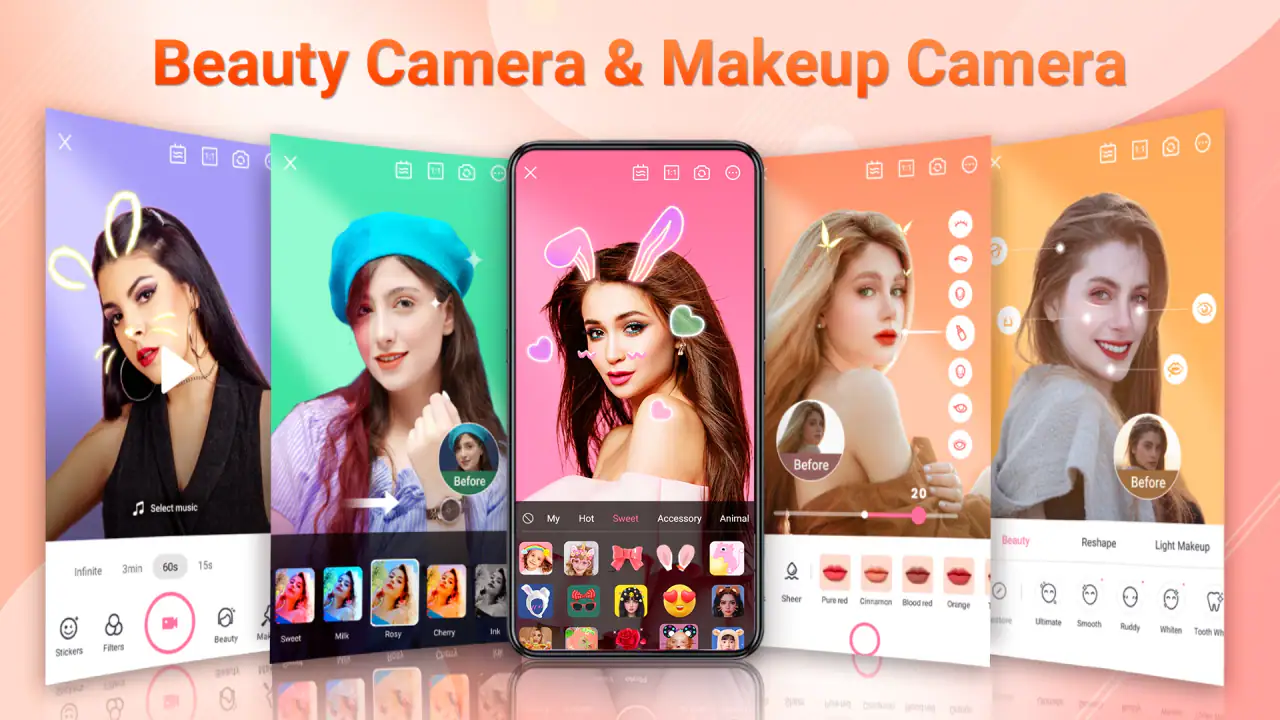
The makeup tools are also best approached as a set of choices rather than a single automatic solution. A soft change can help a quick indoor selfie feel more even, while a stronger style may suit a themed post or a deliberately playful image. I would check the result at normal viewing size before saving it, because an effect that looks attractive while browsing options can feel excessive once the whole face is visible in the final composition.
Filters serve a different purpose from makeup. Makeup changes the impression of the face, while a filter can change the mood of the entire image. I find it useful to make those decisions separately: first decide whether the face needs a beauty or makeup adjustment, then choose a filter that matches the lighting and background. Applying both heavily can make the result look less personal, especially when the original photo already has strong light or color.
Stickers are where the app moves away from straightforward beautification and becomes more social and decorative. They can make a selfie feel less formal, which is useful for private messages, casual posts, or themed images. They are not a replacement for careful composition, though. If the face is already near the edge of the frame, adding decorations around it may make the picture feel crowded. I usually leave enough empty space around the subject before adding anything.
A realistic everyday workflow
Imagine I am about to join a video call or meet friends and want a new profile image before leaving. I can take a few selfies in the same light, compare a natural version with a lightly enhanced one, and use the editor to give the selected picture a consistent mood. If the purpose is a profile image, I would keep stickers out and choose a restrained filter. If the same picture is meant for a casual story or message, a decorative element may make more sense.
This is where the all-in-one design saves effort. I do not need to remember which separate app produced a particular filter or move the photo through several interfaces. I can make the image feel more intentional while keeping the process short. For someone who takes photos spontaneously rather than planning a full shoot, that reduction in friction is more valuable than a long list of advanced editing controls.
Another useful workflow is preparing several versions of the same selfie for different audiences. A natural-looking version can work for a profile, a brighter filtered version can suit a social post, and a sticker-based version can be sent privately to friends. I would keep the original capture untouched and treat the edited versions as alternatives. That makes it easier to change direction without feeling locked into the first effect I tried.
The app can also help users who are not confident with conventional editing software. Instead of starting with sliders and technical terms, I can judge the result visually. That makes the learning process more direct: try an effect, look at the face and background, then keep or remove it. The trade-off is that I may not get the exact correction I want, but the experience is less intimidating than a full manual editor.
Where it performs best
The strongest scenario is a quick portrait where the person is the main subject and the goal is expression rather than documentary accuracy. A casual selfie before an event, a refreshed profile photo, a birthday image, or a playful picture for friends all fit the app well. In these situations, the combined camera and beauty approach gives me enough creative control without slowing down the moment.
It is particularly convenient when the lighting is acceptable but the image feels unfinished. A beauty adjustment can make the portrait feel more deliberate, while a filter can bring the background and skin tones into a shared mood. I would not expect the app to rescue a badly blurred or extremely dark photo, but it works well when the starting image is already usable and only needs visual polish.
The app is also a good match for users who like switching styles. Someone may want a clean portrait in the morning, a soft look for a social update, and a more decorated image later in the day. Having makeup, filters, stickers, and editing in the same app makes that experimentation easy. I can explore without committing to one permanent visual identity.
For younger users, the Everyone age rating and accessible design make the app approachable, although I would still encourage sensible sharing habits. A sticker or filter can make a photo fun, but it is worth checking the final image for background details, school information, house numbers, or anything else that should not be visible before posting it publicly.
The trade-offs behind the convenience
The first limitation is that speed and simplicity usually come at the cost of precision. If I want selective retouching, exact skin-tone correction, detailed masking, or a carefully matched color grade, I would choose a more advanced photo editor. Beauty Camera: Sweet Camera is better when I want a quick visual decision than when I need a technically exact one.
There is also a risk of over-editing. Because the app makes filters, makeup, and decorations easy to try, it encourages experimentation, but not every combination improves the photo. A face can lose its natural character when several strong effects are layered together. My practical rule is to remove one effect whenever the image starts looking more like a template than a person.
The free model deserves attention as well. The app costs nothing to install, but optional purchases are available, with individual items priced from $1.99 to $19.99. I would spend time with the free tools first and decide whether the extra style options genuinely fit my routine. For occasional selfie editing, the free experience may be enough; for someone who wants a larger range of looks, the purchase structure becomes more relevant.
Another trade-off is that a beauty-focused camera is not the best choice for every kind of photograph. I would not use it as my main tool for landscapes, product images, important documents, or pictures where accurate colors matter more than appearance. The app’s personality is centered on faces and visual expression, so a general camera or manual editor is the better option when the subject is not a portrait.
Users should also think about consistency. If I edit every photo with a different combination of makeup and filters, my profile can look disconnected from one image to the next. The app makes it easy to create variety, but a small personal rule helps: choose one or two preferred treatments for regular photos and reserve the more decorative options for special posts. That keeps the results recognizable while still allowing experimentation.
Who gets the most value from it
I would recommend this app to someone who wants a friendly selfie camera with makeup and creative editing in one place. It suits casual users, social-media creators who prioritize quick turnaround, and anyone who finds professional editing apps unnecessarily complicated. The combination is also useful for people who enjoy trying different moods without needing a separate app for every stage.
It is less suitable for a user who dislikes beauty effects, wants completely manual control, or needs a camera designed around technical photography. If your priority is preserving exact facial texture, matching colors across a series, or making precise local adjustments, another editor will likely feel more satisfying. I would also skip it if you only need a basic camera and have no interest in makeup, filters, stickers, or portrait styling.
The current version is 2.1.8, and the app has been available since January 11, 2024. Those details matter mainly because they help identify the version to look for when installing or comparing it with similarly named camera tools. On a compatible Android device, the minimum requirement is Android 6.0, so the operating-system barrier is relatively modest for users with older phones.
My advice is to use a light-touch workflow at first: take the photo, test the makeup effect, remove anything that changes the face too much, and then try a filter only after the portrait already looks good. Add stickers last, and only when they serve the mood of the image. This order prevents the decorative options from hiding whether the underlying selfie is actually working.
My final view after using the full workflow
Beauty Camera: Sweet Camera succeeds because it understands a common need: I want a better-looking selfie, but I do not necessarily want to become an editor to get one. Its camera, makeup, filter, sticker, and editing tools form a practical chain, and that chain is more useful than any one effect on its own. I can move from capture to a finished portrait without repeatedly exporting and reopening the same image.
The app is not a substitute for a professional retouching suite, and its strongest results depend on restraint. When I use it to polish a decent photo, choose effects that match the purpose, and avoid stacking every option, it feels quick and enjoyable. When I expect exact corrections or a completely natural camera experience, its beauty-first design becomes a limitation.
For a free beauty app with an Everyone rating, broad device compatibility, and a large existing audience, I think it is worth trying if your main goal is fast, expressive portrait editing. I would start with the free tools, keep an eye on the optional purchases, and judge the app by whether it makes my own photo routine easier. For casual selfies and playful social images, that is where it offers its clearest value.
FAQs for Beauty Camera: Sweet Camera
What features does Beauty Camera: Sweet Camera offer?
Beauty Camera: Sweet Camera provides a range of features designed to enhance your selfies and photos. It includes real-time beauty filters, skin smoothing, blemish removal, and automatic lighting adjustments. You can also find fun stickers, AR effects, and a range of editing tools to personalize your images before sharing them on social media.
Is Beauty Camera: Sweet Camera free to use, or are there in-app purchases?
Beauty Camera: Sweet Camera is free to download and use, offering a variety of basic features at no cost. However, it also includes in-app purchases for premium features, including advanced filters and editing tools. This allows users to enhance their experience with additional options and effects.
How user-friendly is Beauty Camera: Sweet Camera for beginners?
Beauty Camera: Sweet Camera is designed with user-friendliness in mind, making it accessible for beginners. The interface is intuitive, with clear icons and straightforward navigation. Users can easily apply filters and edit photos with simple taps and swipes, ensuring a smooth experience even for those new to photo editing apps.
Does Beauty Camera: Sweet Camera require an internet connection to function?
While some features of Beauty Camera: Sweet Camera can be used offline, an internet connection is required for downloading additional filters, stickers, and AR effects. Additionally, sharing your edited photos directly on social media platforms will also necessitate an active internet connection.
Is Beauty Camera: Sweet Camera compatible with all devices?
Beauty Camera: Sweet Camera is compatible with most modern Android and iOS devices. However, to ensure optimal performance, it's recommended to check the app's requirements in the respective app store. Devices with outdated operating systems may experience limited functionality or compatibility issues.
Pros
- User-friendly interface for quick edits.
- Wide range of filters and effects available.
- Real-time beauty adjustments enhance selfies.
- High-quality output with minimal distortion.
- Intuitive navigation makes it easy to use.
Cons
- Contains in-app purchases for premium content.
- Some features require a stable internet connection.
- Occasional ads may disrupt the editing process.
- Limited free features compared to competitors.
- Battery drain can occur during extended use.


